Angular NgModule 与组件基础
December 19, 2024 (1y ago)
从这里开始我们来讲语法
NgModule简介
declarations 数组 的规则
该模块想要正常工作,可能会依赖一些组件、指令和管道,那就必须将它们声明到declarations中,不过引入也有一些规则,以组件为例:
- 模块中不能使用未声明过(没有添加到declarations中)的组件
- 一个组件只能被一个模块声明
- 在declarations中的组件默认只能在当前模块中使用,要想让其他模块使用,必须exports出去(参考下文的exports)
以上规则同样适用于指令和管道
imports 数组规则
imports数组只会出现在@NgModule装饰器中,一个模块想要正常工作,除了本身的依赖项(declarations),还可能需要其他模块导出的依赖项。
只要是angular module,都可以导入imports数组中,比如自定义的模块,第三方或者ng内置的都可以
bootstrap 数组规则
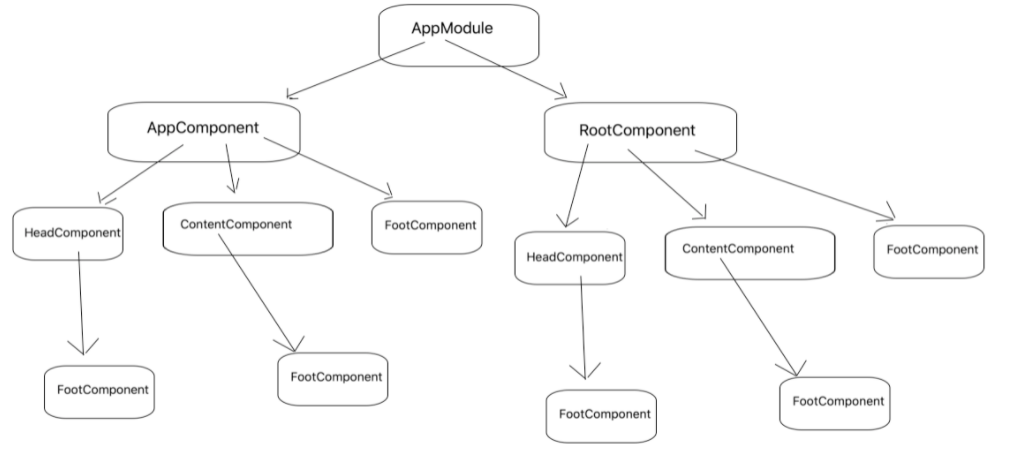
应用是通过引导根模块 AppModule 来启动的,引导过程还会创建 bootstrap 数组中列出的组件,并把它们逐个插入到浏览器的 DOM 中。
该数组中的每个组件,都作为组件树的根(根组件),后续所有组件都是基于根组件的(如图)。
虽然也可以在宿主页面中放多个组件,但是大多数应用只有一个组件树,并且只从一个根组件开始引导。
这个根组件通常叫做 AppComponent,并且位于根模块的 bootstrap 数组中。
# app.module.ts
import { BrowserModule } from '@angular/platform-browser';
import { NgModule } from '@angular/core';

import { AppRoutingModule } from './app-routing.module';
import { AppComponent } from './app.component';

//  这是一个NgModule
// angular module就是一个普通的类,但是这个类,一旦被@NgModule所装饰
,那这个类就可以被称为angular module

@NgModule({
  declarations: [
    AppComponent  // 该模块的依赖项 需要显示的声明
  ],
  imports: [
    BrowserModule,  //导入其他的ngModule
    AppRoutingModule
  ],
  providers: [],   // 这个是  给外界提供的 服务 service  提供各种服务。
  bootstrap: [AppComponent]  // 这个属性一般只有根组件用到,在main中使用了它
  根组件,Angular 创建它并插入 index.html 宿主页面
})
export class AppModule { }


# main.ts
import { enableProdMode } from '@angular/core';
import { platformBrowserDynamic } from '@angular/platform-browser-dynamic';
import { AppModule } from './app/app.module';
import { environment } from './environments/environment';
import 'bootstrap';

if (environment.production) {
  enableProdMode();
}

platformBrowserDynamic().bootstrapModule(AppModule)
  .catch(err => console.error(err));
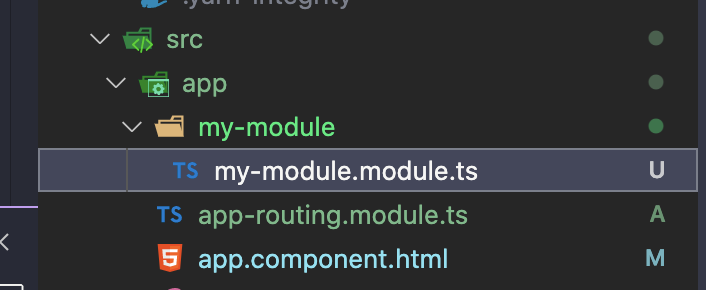
那么我们如何创建一个Moduel? 使用cli就可以了 CLI地址
ng g module  my-module

# 如果你这样写 就会生成子文件
ng g module  my-module/chile-module
生成之后的样子
import { NgModule } from '@angular/core';
import { CommonModule } from '@angular/common';


@NgModule({
  declarations: [],
  imports: [
    CommonModule
  ]
})
export class MyModuleModule { }
基础的展示数据
显示数据
ng的模版中,默认用双大括号{{}}绑定组件中的变量显示出来
import { Component } from '@angular/core';

// @Component({
//   selector: 'app-root',  // 选择器和dom的选择器保持一致的语法
//   template: `
//     <h1>{{title}}</h1>
//     <h2>My favorite hero is: {{myHero}}</h2>
//     `,
//   styles: [`h1 { color: red }`]
// })
// @Component({
//   selector: 'app-root',
//   templateUrl: './app.component.html',
//   styleUrls: ['./app.component.scss']
// })
export class AppComponent {
  title = 'myapp';
}
模版表达式
import { Component } from '@angular/core';

// @Component({
//   selector: 'app-root',
//   templateUrl: './app.component.html',
//   styleUrls: ['./app.component.scss']
// })

@Component({
  selector: 'app-root',  // 选择器和dom的选择器保持一致的语法
  template: `
    <h1>{{title}}</h1>
    <h2>My favorite hero is: {{myHero}}</h2>
    <br/>
    <h2>Fn:{{ getValue() }}</h2>
    <br />
    <p>与方法结合 {{ price * 0.7 + getValue() }}.</p>
    `,
  styles: [`h1 { color: red }`]
})
export class AppComponent {
  // 绑定变量
  title = 'myapp';
  myHero  = '666';
  price  = 23;

  // 绑定方法
  getValue = () => {
    return "XXX"
  }
  // 注意: 使用模板表达的时候一定要注意 不能有副作用的变量!
}
绑定属性
主要用来绑定html中的属性 比如img 的src a标签的href等...
import { Component } from '@angular/core';

@Component({
  selector: 'app-root',
  template: `
    <div>
    // 一般的属性
    <br/>
    <img src="../assets/01.png" alt="madao" />
    <img [src]="imgValue" alt="madao" />
    <img bind-src="imgValue" alt="madao" />
    <br>
    <table class="table-bordered">
      <tr>
        <th>name</th>
        <th>phone</th>
        <th>age</th>
      </tr>
      <tr>
        <td>张三</td>
        <td>13398490594</td>
        <td>33</td>
      </tr>
      <tr>
        <td [colSpan]="colSpan">李四</td>
        <td>15079049984</td>
        <td>22</td>
      </tr>
    </table>
    <button class="btn btn-primary" [disabled]="isDisabled">click</button>
    </div>
    // 自定义的属性 规范:虽然{{ 2 }}也能给属性绑定值 但是还是建议 写 [ ]
    <br />
    <span [attr.data-title]="customTitle">一行文字</span>
    <span [attr.title]="customTitle">test title</span>
    <span [title]="customTitle">test title</span>
    `,
  styles:[
    ` img { width:200px; } `
  ]
})
export class AppComponent {

  imgValue = '../assets/01.png';
  user = {
    name: 'madao',
    pic: this.imgValue
   };
   colSpan = 2;
   isDisabled = false;
   customTitle = '还是老李NB';
}
绑定样式
实际上绑定样式也是非常的简单 需要注意的一点就是其的 优先级的问题 总结下来就是两点
- 某个类或样式绑定越具体,它的优先级就越高
- 绑定总是优先于静态属性
import { Component } from '@angular/core';

// @Component({
//   selector: 'app-root',
//   templateUrl: './app.component.html',
//   styleUrls: ['./app.component.scss']
// })

@Component({
  selector: 'app-root',  // 选择器和dom的选择器保持一致的语法
  template: `
    // 绑定class当个的
    <hr />
    <button type="button" class="btn" [class.btn-primary]="theme === 'primary'">Primary</button>
    <button type="button" class="btn" [class.btn-secondary]="true">secondary</button>
    <button type="button" class="btn" [class.btn-success]="isSuccess">success</button>
    <button type="button" class="btn" [class.btn-danger]="'啦啦啦'">danger</button>
    <button type="button" class="btn" [class.btn-danger]="0">danger</button>
    <button type="button" class="btn" [class.btn-danger]="undefined">danger</button>
    // 绑定class多个的
    <hr />
    <!-- 也可以用内置指令ngClass   [ngClass]="btnCls" 等价于 class.btnCls -->
    <button type="button" [ngClass]="btnCls">btnCls</button>
    <button type="button" [ngClass]="btnCls2">btnCls2</button>
    <button type="button" [ngClass]="btnCls3">btnCls3</button>
    <br />
    // 绑定Style
    <hr />
    <!-- 及其不推荐的写法!单个 style -->
    <p [style.height]="'50px'" [style.border]="'1px solid'">设置高度</p>
    <!-- 多个!style -->
    <p [ngStyle]="style3">style3</p>
    `,
  styles:[
    ` img { width:200px; } `
  ]
})
export class AppComponent {
    theme = 'primary';
    isSuccess = true;

    btnCls = 'btn btn-primary';
    btnCls2 = ['btn', 'btn-success'];
    btnCls3 = {
      btn: true,
      'btn-info': true
    };

    style3 = {
      width: '200px',
      height: '50px',
      'text-align': 'center',
      border: '1px solid'
    }

}
创建组件
上面的东西我们观察了一下发现 实际上都放在了 app.component.ts 这一个组件中,那么我们如何自己创建自己的组件呢? CLI文档
# 下面的cli命令就能执行做到这件事

ng g c comp1 (在src/app下创建名为comp1的组件)

ng g c components/comp1 (在src/app/components下创建名为comp1的组件)

# 生成之后会自动的在你的app.module中的import 中加入它 如果没有你需要加 要不然你的app.componet
组件中 你就无法使用它
同样的 我们也有些指定的options ,具体在CLI文档中对这个 命令 有详细的描述
ng g c component1 --inline-style --inline-template --skip-tests这条命令 之后 生成了一个组件 你需要这样去使用它
# app-component1 文件夹中,默认的 创建出来的组件 的  selector 都是以app- 开头 如何去修改
它呢?

# tslint.js
++++
    "directive-selector": [
      true,
      "attribute",
      "app", // 这个东西就是咯
      "camelCase"
    ],
++++

# component1.component.ts
import { Component, OnInit } from '@angular/core';

@Component({
  selector: 'app-component1',
  template: `
    <p>
      component1 works!
    </p>
  `,
  styles: [
  ]
})
export class Component1Component implements OnInit {

  constructor() { }

  ngOnInit(): void {
  }

}

# 在我们原来的app.components.ts中使用它
import { Component } from '@angular/core';

@Component({
  selector: 'app-root',  // 选择器和dom的选择器保持一致的语法
  template: `
  <app-component1 > </app-component1>
    `,
  styles:[
    ` img { width:200px; } `
  ]
})
export class AppComponent {

}
绑定事件
对于绑定事件来说也是非常的简单的
import { Component } from '@angular/core';

@Component({
  selector: 'app-root',
  template: `
  <div *ngFor="let item of list">
    <button
      type="button"
      class="btn btn-primary"
      (click)="onClick($event, item )">{{ item.name }}</button>
  </div>
  `,
  styleUrls: ['./app.component.scss']
})

export class AppComponent {
    list  = [  {
      name:'老李',
    }, {
      name: '老王'
    }, ];

    onClick = ( e:MouseEvent, value ) => {
      console.log('value1', event.target);
      console.log(' value2', value);
    };
}
这里用到了一个循环渲染列表的模板语法 我们暂时不用过多了解你只需要知道是怎么用的就完了
组件间的通信
我们一般在vue 和react 中都叫做什么 props 和 回调 但是在ng中换了个名字 叫做:“输入/输出 属性”
具体的语法如下
首先,我们为了演示这个语法 需要坐下面的工作, 先创建组件
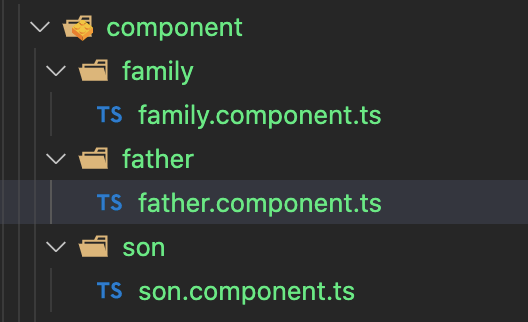
然后我们先看父子
# father
import { Component, OnInit } from '@angular/core';


@Component({
  selector: 'app-father',
  template: `

  <!--正常的使用
  <app-son
    [item]=[item]
    (newItemEvent)="addItem($event)"
    ></app-son>-->

  <div>
    <!--别名-->
     <app-son
        [aliasItem]=[item]
        (newItem)="addItem($event)"
        ></app-son>
    </div>
  `,
  styles: [
  ]
})
export class FatherComponent implements OnInit {

  item = '2'

  addItem(newItem: string) {
    console.log('你来啦', newItem);
  }

  constructor() {}

  ngOnInit(): void {
  }

}

# son

import { Component, OnInit, Input, Output, EventEmitter } from '@angular/core';

@Component({
  selector: 'app-son',
  template: `
    <div>
      Today's item: {{item}}
      <hr />
      // 给父组件发射值
      <br />
      <label>Add an item: <input #newItem></label>
      <button (click)="addNewItem(newItem.value)">Add to parent's list</button>

    </div>
  `,
  styles: [
  ]
})
export class SonComponent implements OnInit {
  // @Input() item: string; // 接受属性 就想在vue中需要给props做点声明一样
  // @Output() newItemEvent = new EventEmitter<string>();  // 给父组件的回调

  // 如果你需要使用别名就这样就好了
  @Input('aliasItem') item: string; // 接受属性 就想在vue中需要给props做点声明一样
  @Output('newItem') newItemEvent = new EventEmitter<string>();  // 给父组件的回调

  addNewItem(value: string) {
    this.newItemEvent.emit(value);
  }

  constructor() {}

  ngOnInit(): void {
    console.log(this.item);
  }

}
然后再回过头 想一下 不相干的组件怎么办? 实际上依然可以 采取 :“状态提升”的逻辑来搞事情,但是对于NG来说 通信有好多好多的方式 状态提升 可以作为一种,但绝不是 最好的方式在ng中