Navigation
阅读进度0%
React 编码规范与最佳实践指南
December 19, 2024 (1y ago)
React
JavaScript
CodingStandards
经过差不都三个多月的实践,本人对自己的React代码编程的规范有了进一步的加深了解
,在vue上有开源的文章和规范作为指导,在React方向上这方面少得可怜,因此本人结合自己在工作上的终结
摸索出这样的一套合理的符合代码编写风格的React_PC指南,注意由于我们使用的阿里家同款的所有技术栈,于是这里有些东西是我们比选的比如说
一、代码测层面的规范
1. 代码的布局如下
// MyComponent
 import React, { useState, useRef,useEffect, useCallback, useContext } from 'react'


 /**
  * Preset
  */


const MyComponent = () => {
 /**
  * state
  */


 /**
  * method
  */


 /**
  * effct
  */


 /**
  * componentsConfig
  */


 /**
  * render
  */
 return(
    <>
     <h1>BMlaoli-coding....</h1>
    </>
   )
 }

export default MyComponent
2. 依赖包的美观程度
import { PageHeaderWrapper } from '@ant-design/pro-layout';
import config from '@/utils/config';
import ProTable from '@ant-design/pro-table';
import { useRequest } from 'ahooks';
import { Card, Input, Select, Tag, Popconfirm, Button } from 'antd';
import { page, deleteArrange } from '@/services/service';
import React, { useEffect, useRef, useState } from 'react';

//以上的代码显得有些混乱。不过也是不要紧的
/**
 * 资产回收站Table表格
 */
import React, { useState, useRef, useEffect, useCallback, useContext } from 'react';
import { Card, Button, message, Row, Col, Select, Form, Cascader, Space, Popconfirm, Alert, Input, } from 'antd';
import { getHeader, deleteAsset, page, getTags } from '@/pages/Dashboard/services/assetDetail';
import { getNamespace } from '@/pages/discovery/Setting/services/discoveryJob';
import { PageHeaderWrapper } from '@ant-design/pro-layout';
import { getAssetModel } from '@/services/assetModel';
import ProTable from '@ant-design/pro-table';
import { PlusOutlined } from '@ant-design/icons';
import { operate } from '@/services/recycle';
import config from '@/utils/config';
import { useRequest } from 'ahooks';
import { Link } from 'umi';
import DrawerHH from '../Drawer';
import moment from 'moment'

const { Option, OptGroup } = Select;

//以上的代码需要非常注意的一点我一定要提醒你,如果包之间有明确的依赖关系,那你就不能这样做,会凉凉的
//但是我们依然不推荐使用如上的格式,因为它会造成一些非必要的问题,如果你不是和我一样有强迫症 这个import导包的地方是非必要的,这样就差不多了
3. 注意事项
请注意给你的代码加上注释,我发现好多的朋友都必须会加注释,当一个项目组中有很多人共同完成很多的代码的时候,这样维护的成本是不可想象的
如果有重大bug或者有人离职了,那么它的代码将会无人看懂,逻辑的堆叠将会是不可开交的
// 获取标签
  const { run: getTageList } = useRequest(getTags, {
    onSuccess: (result) => {
      if (result && result.success) {
        setTagList(result.data);
        getColumns({ tableName: location.query.tableName });
      }
    },
  });


  /**
 * componentsConfig
 */
  // 用户自定义的检索项 标签
  const TagtSearch = (_, p) => {
    return (
      <Select mode="multiple" placeholder="请选择标签" showArrow
        {...p}
      >
        { tagList.map((item) => (
          <OptGroup label={item.name} key={item.id}>
            {(item.tags ? item.tags : []).map((items) => (
              <Option value={items.name} key={items.id}>
                {items.name}
              </Option>
            ))}
          </OptGroup>
        ))}
      </Select>
    )
  }

  // 网络域
  const NamespaceSearch = (_, p) => {
    return (
      <Select placeholder="请选择网络域" {...p}>
        {  namespace.map(item => (
          <Option key={item.id} value={item.name}>{item.name}</Option>
        ))}
      </Select>
    )
  }

  /**
   * method
   */
  /** 注意,这样的代码仅仅适用于,复杂的子程序注释,不要四处滥用
   * 描述
   * 动态啊的获取表头
   * @author lishizeng
   * @date 2020-10-10
   * @param {Array} data 获取的数据
   * @returns {any}
   */
  const dynamicSetColums = (value) => {

    let data = value.map((item) => {
      let valueType = 'text';
      if (item.propertyType === 'DATETIME') {
        valueType = 'dateTime';
      } else if (item.propertyType === 'DATE') {
        valueType = 'date';
      } else if (item.propertyType === 'TIME') {
        valueType = 'time';
      }
      const basicColumns = {
        hideInSearch: !InCulde.includes(item.name),
        title: item.name,
        dataIndex: item.propertyName,
        width: 200,
        ellipsis: true,
        sorter: tru
        ......


  // 你可以非常清晰的看到我的代码的注释,有些代码的注释比较复杂,@什么什么的,但是有的代码看起来比较的简单,只有 // 那么问题来了,我什么时候 *全注释什么时候用
        //呢,我认为如果全部都是/*@*/那么 代码虽然很ok,但是这个和我们的开发效率是不符的
       ,因此什么时候用/*@*/什么时候用//,我们还是看情况来配置是比价合适的

 ----> 目前我个人比较推崇的规范是:
        1. 一切以简单为主 //
        2. 如果是组件的东西 可以使用 /**/
        3. 如果是代码复杂的地方,可以
           /**
             * 描述
             * 动态啊的获取表头
             * @author lishizeng
             * @date 2020-10-10
             * @param {Array} data 获取的数据
             * @returns {any}
             */
        4. 原则,如果你编写注释的时间,耗费了你代码的时间,那么你应该考虑一下了,这样的代码注释是不是太有必要?
4. 一个不规范的代码&&一个编码风格良好的代码
以下的代码维护和可阅读性简直😭
- 质量不是很好的代码示例
import React, { useState, useRef, useEffect, useCallback, useContext, createRef } from 'react'
import {
  Form, Drawer, Button, Input, Collapse, Row, Col, message,
  Select, Checkbox, Radio, Tree, Tabs, Space, DatePicker, Spin, Popover
} from 'antd'
import config from '@/utils/config';
import { CloseOutlined, MinusCircleOutlined, PlusOutlined } from '@ant-design/icons'
import { createCheckTaks, getTackById, getServieceScenes, getConfigByServieceScenes, getAssetLoctionByServieceScenes } from '../../service'
import TaskType from './TaskType'
import TreeConfig from './Tree'
import { useRequest } from 'ahooks'
import { history, useModel } from 'umi';
import Execution from './ExecutionType'
import moment from 'moment'
const { Panel } = Collapse;
const { TabPane } = Tabs;
import _ from 'lodash'

/**
 * 预置方法
 */
const InspectionMode = ({ actionRef, visable, setVsiable, itemValue, setItemValue, formDefalutValues, setFormDefalutValues }) => {
  /**
   * 初始化数据
   */
  const [form] = Form.useForm();
  const [propsTreeData, setPropsTreeData] = useState([])
  const [treeDefaultDataChangeValue] = useState('VMWARE')
  const { initialState } = useModel('@@initialState');

  const [servieceScenesList, setServieceScenesList] = useState([])

  const [servieceScenesIdType, setServieceScenesIdType] = useState(null)
  const [servieceScenesId, setServieceScenesId] = useState(0)
  const [assetObjcet, setAssetObjcet] = useState([])
  /**
   * 方法
   */
  const close = () => {
    setItemValue(Object.assign([], []))
    form.resetFields();
    setVsiable(false)
    setFormDefalutValues(null)
  };

  const { run: initServieceScenes, } = useRequest(getServieceScenes, {
    manual: true,
    onSuccess: (result, params) => {
      if (result && result.success) {
        setServieceScenesList(_.filter(result.data, (v) => v.name !== '自定义'))
      }
    },
  });

  const { run: initConfigByServieceScenes, } = useRequest(getConfigByServieceScenes, {
    manual: true,
    onSuccess: (result, params) => {
      if (result && result.success) {
        if (servieceScenesIdType) {
          initAssetLoctionByServieceScenes(servieceScenesId)
        }
      }
    },
  });

  const { run: initAssetLoctionByServieceScenes, } = useRequest(getAssetLoctionByServieceScenes, {
    manual: true,
    onSuccess: (result, params) => {
      if (result && result.success) {
        setAssetObjcet(result.data)
      }
    },
  });

  // 选择场景
  const servieceScenesChange = (value, b, c) => {
    setServieceScenesIdType(b.typeS)
    setServieceScenesId(value)
  }

  useEffect(() => {
    // if(itemValue.length>0){
    // }
    // // setServieceScenesIdType(() => {
    // //   if (itemValue.assetIdList === 0) {
    // //     return 1
    // //   } else {
    // //     return 0
    // //   }
    // // })

    if (servieceScenesId) {
      initConfigByServieceScenes(servieceScenesId)
    }
  }, [servieceScenesId])

  const onSubmit = () => {
    if (propsTreeData.length == 0) {
      message.error('请至少选择一个检查项!')
      return
    }
    form
      .validateFields()
      .then(async (values) => {
        // console.log(values);
        let FormObject = {
          id: values.id ? values.id : undefined,
          name: values.name,
          taskType: values.ip ? 2 : 1,
          performStatus: values.performStatus,
          performTimeSource: values.performStatus == 1 ?
            moment(values.performTimeSourceE).format('YYYY-MM-DD hh:mm:ss') :
            values.performTimeSource,
          description: values.description || '',
          userId: values.userId,
          userName: values.userName,
          configIdList: propsTreeData,
          serviceVersionId: values.serviceVersionId || 1,
          adviceObjectList: !values.ip ? null : [{
            ip: values.ip,
            user: values.user,
            password: values.password
          }],
          assetIdList: values.assetIdList
        }

        console.log(FormObject, '+++>');

        const { success } = await createCheckTaks(FormObject)
        if (success) {
          message.success('设置成功')
        }
        actionRef.current.reload()
        form.resetFields();
        setItemValue(Object.assign([], []))
        setFormDefalutValues(null)
        setVsiable(false)
      })
      .catch((info) => {
        console.log(info);
      });
  }

  const handleChange = (value) => {
  }

  const initItemValue = async (value) => {
    try {
      const { data } = await getTackById(value)
      setFormDefalutValues(data)
    } catch (error) {
      message.error(error)
    }
  }

  // 级联检查项
  const callback = () => {
  }

  /**
   * 生命周期
   */
  useEffect(() => {
    initServieceScenes()
  }, [itemValue])

  /**
   * 组件配置
   */
  // 指定任务执行时间,展开项组件
  // Drawer页脚
  const DrawerFooter = () => {
    return (
      <div style={{ float: "right", marginRight: 15 }}>
        <Button style={{ marginRight: 8 }} onClick={close}>取消</Button>
        <Button type='primary' onClick={onSubmit}>提交</Button>
      </div>
    )
  }


  /**
   * 视图
   */
  return (
    <>
      <Drawer
        title={itemValue.id ? '编辑巡检任务' : '新增巡检任务'}
        placement="right"
        onClose={close}
        visible={visable}
        closable={true}
        closeIcon={<CloseOutlined />}
        destroyOnClose={true}
        width={800}
        footer={DrawerFooter()}
      >
        <Form
          // style={{ width: 500 }}
          preserve={false}
          form={form} layout="horizontal"
          onFinish={(value) => {
          }}
          size="large"
          layout="horizontal"
        >
          <Form.Item
            {...config.modalFormItemLayout}
            label="任务名称"
            name='name'
            rules={[
              { required: true, message: '请输入任务名称', },
              { max: 20, message: '名称不能超过20个字符' },
            ]}
            initialValue={itemValue && itemValue.name}
          >
            <Input placeholder="请输入任务名称" />
          </Form.Item>

          <Form.Item
            label="任务描述"
            {...config.modalFormItemLayout}
            name='description'
            initialValue={itemValue && itemValue.description}
          >
            <Input.TextArea placeholder="请输入描述" />
          </Form.Item>

          <Form.Item
            {...config.modalFormItemLayout}
            name="serviceVersionId"
            label="选择巡检场景"
            initialValue={itemValue && itemValue.serviceVersionId}
            rules={[{ required: true, message: '请选择巡检场景' }]}
          >
            <Select disabled={itemValue && itemValue.serviceVersionId} placeholder="请选择巡检场景" onChange={servieceScenesChange} >
              {servieceScenesList.map((item) => (
                <Option typeS={item.type} value={item.id} key={item.id}>
                  {item.serviceVersionName}
                </Option>
              ))}
            </Select>
          </Form.Item>

          <Form.Item
            noStyle
            shouldUpdate={(prevValues, currentValues) => prevValues.serviceVersionId !== currentValues.serviceVersionId}
          >
            {({ getFieldValue }) => {
              return getFieldValue('serviceVersionId') ? (
                <>
                  {
                    servieceScenesIdType
                      ? (
                        <Form.Item
                          label="巡检对象"
                          {...config.modalFormItemLayout}
                          name='assetIdList'
                          rules={
                            [{ required: true, message: '请选择一个巡检对象' }]
                          }
                        >
                          <Select
                            mode='multiple'
                            placeholder="请选择巡检对象" >
                            {assetObjcet.map((item) => (
                              <Option typeS={item.type} value={item.id} key={item.id}>
                                {item.assetName}
                              </Option>
                            ))}
                          </Select>
                        </Form.Item>
                      )
                      : (
                        <>
                          <Form.Item
                            label='IP'
                            name='ip'
                            {...config.modalFormItemLayout}
                            rules={
                              [{ required: true, message: 'VC地址是必填的!' }, {
                                pattern: config.ipExp,
                                message: '请输入正确的IP地址',
                              }]
                            }
                            initialValue={formDefalutValues && formDefalutValues.adviceObjectList[0].ip}
                          >
                            <Input addonBefore="https://" disabled={formDefalutValues} placeholder="请输入VC地址" />
                          </Form.Item>
                          <Form.Item
                            {...config.modalFormItemLayout}
                            label='用户名'
                            name='user'
                            rules={
                              [{ required: true, message: '用户名是必填的!' }]
                            }
                            initialValue={formDefalutValues && formDefalutValues.adviceObjectList[0].user}
                          >
                            <Input disabled={formDefalutValues} placeholder="请输用户名" />
                          </Form.Item>
                          <Form.Item
                            {...config.modalFormItemLayout}
                            label='密码'
                            name='password'
                            rules={
                              [{ required: true, message: '密码是必填的!' }]
                            }
                            initialValue={formDefalutValues && formDefalutValues.adviceObjectList[0].password}
                          >
                            <Input.Password disabled={formDefalutValues} placeholder="请输入密码" />
                          </Form.Item>
                          <Form.Item initialValue={2} name="taskType" noStyle>
                            <Input type="hidden" />
                          </Form.Item>
                        </>
                      )
                  }
                  <Form.Item
                    label="检查项"
                    {...config.modalFormItemLayout}
                    name='configIdList'
                  >
                    <Popover
                      content="必须选择一个检查项"
                      visible={propsTreeData.length == 0}
                    >
                      <TreeConfig
                        id={servieceScenesId}
                        formDefalutValues={formDefalutValues}
                        treeDefaultDataChangeValue={treeDefaultDataChangeValue}
                        setPropsTreeData={setPropsTreeData} />
                    </Popover>
                  </Form.Item>

                  <Form.Item
                    label="执行任务"
                    {...config.modalFormItemLayout}
                    name='execution_time'
                  >
                    <Execution itemValue={itemValue} />
                  </Form.Item>
                  <Form.Item initialValue={initialState.currentUser && initialState.currentUser.id} name="userId" noStyle>
                    <Input type="hidden" />
                  </Form.Item>
                </>
              ) : null;
            }}
          </Form.Item>
          <Form.Item initialValue={initialState.currentUser && initialState.currentUser.username} name="userName" noStyle>
            <Input type="hidden" />
          </Form.Item>
          <Form.Item initialValue={itemValue && itemValue.id} name="id" noStyle>
            <Input type="hidden" />
          </Form.Item>
        </Form>

      </Drawer>
    </>
  )
}

export default InspectionMode上述代码的诟病:__
- 整体的规范布局凌乱,比如state没有写在一起
- 组件没有很好的分离,过多的if else 嵌套和判断,让你头昏脑涨
- 质量还不错的代码示例
/**
 * 资产回收站Table表格
 */
import React, { useState, useRef, useEffect, useCallback, useContext } from 'react';
import { Card, Button, message, Row, Col, Select, Form, Cascader, Space, Popconfirm, Alert, Input, PageHeader } from 'antd';
import { getHeader, deleteAsset, page, getTags } from '@/pages/Dashboard/services/assetDetail';
import { getNamespace } from '@/pages/discovery/Setting/services/discoveryJob';
import { PageHeaderWrapper } from '@ant-design/pro-layout';
import { getAssetModel } from '@/services/assetModel';
import ProTable from '@ant-design/pro-table';
import { PlusOutlined } from '@ant-design/icons';
import { operate } from '@/services/recycle';
import config from '@/utils/config';
import { useRequest } from 'ahooks';
import { Link, history } from 'umi';
import DrawerHH from '../Drawer';
import moment from 'moment'
const { Option, OptGroup } = Select;

/**
 * Preset
 */
const layout = {
  labelCol: { span: 6 },
  wrapperCol: { span: 18 },
};
let x = 200;
let InCulde = ['资产编号', '资产名称', '网络域'];
const RecycleDetail = ({ location }) => {
  /**
   * state
   */
  const actionRef = useRef(null);
  const [size, setSize] = useState('middle');
  const [tableNames, setTableNames] = useState(location.query.tableName);
  const [columns, setColumns] = useState([]);
  const [basicProps, setBasicProps] = useState({ drawerVisible: false });
  const [namespace, setNamespace] = useState([]);
  const [tagList, setTagList] = useState([]);
  const [otheSearch, setOtheSearch] = useState({
    sorter: null,
    sortOrder: null,
    tableName: location?.query?.tableName,
    del: 1,
    state: 0,
  })

  // 获取名称列表
  const { run: getNameSpaceList } = useRequest(getNamespace, {
    onSuccess: (result) => {
      if (result && result.success) {
        setNamespace(result.data);
      }
    },
  });

  // 获取标签
  const { run: getTageList } = useRequest(getTags, {
    onSuccess: (result) => {
      if (result && result.success) {
        setTagList(result.data);
        getColumns({ tableName: location.query.tableName });
      }
    },
  });


  /**
 * componentsConfig
 */
  // 用户自定义的检索项 标签
  const TagtSearch = (_, p) => {
    return (
      <Select mode="multiple" placeholder="请选择标签" showArrow
        {...p}
      >
        { tagList.map((item) => (
          <OptGroup label={item.name} key={item.id}>
            {(item.tags ? item.tags : []).map((items) => (
              <Option value={items.name} key={items.id}>
                {items.name}
              </Option>
            ))}
          </OptGroup>
        ))}
      </Select>
    )
  }

  // 网络域
  const NamespaceSearch = (_, p) => {
    return (
      <Select placeholder="请选择网络域" {...p}>
        {  namespace.map(item => (
          <Option key={item.id} value={item.name}>{item.name}</Option>
        ))}
      </Select>
    )
  }

  /**
   *
   * renderFormItem: TimeLimit,
        formItemProps: {
          label: "选择时间",
        },
   */

  /**
   * method
   */
  /**
   * 描述
   * 动态啊的获取表头
   * @author lishizeng
   * @date 2020-10-10
   * @param {Array} data 获取的数据
   * @returns {any}
   */
  const dynamicSetColums = (value) => {
    let data = value.map((item) => {
      // 目前的方案是 先全部排序,然后给定几个范围去掉排序,排序的信息来源一定是表头数据
      let sorter = false;
      let valueType = 'text';
      if (item.propertyType === 'DATETIME') {
        valueType = 'dateTime';
        sorter = true;
      } else if (item.propertyType === 'DATE') {
        valueType = 'date';
        sorter = true;
      } else if (item.propertyType === 'TIME') {
        valueType = 'time';
        sorter = true;
      } else if (item.propertyType === 'INT') {
        sorter = true;
      }
      const basicColumns = {
        hideInSearch: !InCulde.includes(item.name),
        title: item.name,
        dataIndex: item.propertyName,
        width: 200,
        ellipsis: true,
        sorter,
        valueType,
        renderFormItem: (_, p, form) => {
          if (item.name === '网络域') {
            return NamespaceSearch(_, p)
          }
          if (_.valueType === 'text') {
            return <Input placeholder={`请输入${p.label}`} {...p} />;
          } else {
            return p.defaultRender(_);
          }
        },
        render: (_, record) => {
          if (record[item.propertyName]) {
            if (item.propertyType === 'DATETIME') {
              return (<Tooltip title={moment(record[item.propertyName]).format('YYYY-MM-DD HH:mm:ss')}>{moment(record[item.propertyName]).format('YYYY-MM-DD HH:mm:ss')}</Tooltip>)
            } else if (item.propertyType === 'DATE') {
              return (<Tooltip title={moment(record[item.propertyName]).format('YYYY-MM-DD')}>{moment(record[item.propertyName]).format('YYYY-MM-DD')}</Tooltip>)
            } else if (item.propertyType === 'TIME') {
              return (<Tooltip title={moment(record[item.propertyName]).format('HH:mm:ss')}>{moment(record[item.propertyName]).format('HH:mm:ss')}</Tooltip>)
            } else {
              return _
            }
          } else {
            return '-';
          }
        },
      };
      // x += 200;
      return basicColumns;
    });

    data.push({
      title: '标签',
      dataIndex: 'tag',
      width: 200,
      renderFormItem: (_, p, form) => {
        return TagtSearch(_, p)
      }
    })

    data.push({
      title: '操作',
      dataIndex: 'id',
      width: 200,
      hidden: false,
      default: true,
      sorter: false,
      valueType: 'option',
      fixed: 'right',
      render: (text, obj) => {
        return [
          <a
            key="1"
            style={{ marginRight: 5 }}
            onClick={() =>
              openDetail({
                id: obj._id,
                tableName: tableNames,
                ciTypeId: obj.ciTypeId,
                name: obj.name,
              })
            }
          >
            详情
          </a>,
          <a key="2" >
            <Popconfirm
              title="您确认要恢复吗?"
              onConfirm={() => operateRun({ id: obj._id, ciTypeId: obj.ciTypeId, type: '0' })}
              okText="是"
              cancelText="否"
            >
              恢复
            </Popconfirm>
          </a>,
          <a key="3" >
            <Popconfirm
              title="您确认要清空吗?"
              onConfirm={() => operateRun({ id: obj._id, ciTypeId: obj.ciTypeId, type: '1' })}
              okText="是"
              cancelText="否"
            >
              清空
            </Popconfirm>
          </a>,
        ];
      },
    });
    setColumns(data);
  }

  // 获取动态表头
  const { run: getColumns, loading } = useRequest(getHeader, {
    manual: true,
    onSuccess: (result) => {
      if (result && result.success) {
        dynamicSetColums(result.data)
      } else {
        message.error(result.message || '网络请求错误', 5);
      }
    },
  });

  // 打开详情
  const { run: operateRun } = useRequest(operate, {
    manual: true,
    onSuccess: (result) => {
      if (result && result.success) {
        message.success(result.codeMessage);
        actionRef.current.reload();
      }
    },
  });

  // 表格的数据加载方法
  const loadData = async (params) => {
    const response = await page(params);
    return {
      success: response.success,
      ...response.data.list
    };
  };

  const onTableChange = (p, f, s) => {
    setOtheSearch((oldData) => {
      return {
        ...oldData,
        ...{
          sorter: s.field || '',
          sortOrder: s.order || ''
        }
      }
    })
  };

  const drawerProps = {
    ...basicProps,
    onClose: () => {
      setBasicProps({
        drawerVisible: false,
        id: undefined,
        tableName: undefined,
      });
    },
  };

  const openDetail = (data) => {
    setBasicProps({
      ...data,
      drawerVisible: true,
    });
  };


  /**
   * effct
   */
  useEffect(() => {
    if (location.query.tableName) {
      setOtheSearch((oldData) => {
        return { ...oldData, ...{ tableName: location.query.tableName } }
      })
      getNameSpaceList();
      getTageList();
    }
  }, [location.query.tableName]);


  /**
   * render
   */
  return (
    <PageHeaderWrapper
      onBack={() => history.push({ pathname: '/recycle' })}
      title='资产回收站'
    >
      <Card loading={loading}>
        <ProTable
          search={{
            labelWidth: 0,
            optionRender: (a, b) => {
              return [<Button key='id' type='primary' onClick={() => b.form.submit()} > 查询 </Button>, <Button key='id' onClick={() => {
                b.form.resetFields(); b.form.submit();
                // setUseList({
                //   userIdList: ''
                // })
              }}> 重置 </Button>]
            }
          }}
          beforeSearchSubmit={(T) => {
            if (T.tag && T.tag.length > 0) {
              T.tag = T.tag.join(',')
            }
            return T
          }}
          onReset={() => {
            setOtheSearch(
              (oldData) => {
                oldData.namespace = ''
                oldData.tags = ''
                return oldData
              }
            )
          }}
          size={size}
          onSizeChange={(size) => {
            setSize(size);
          }}
          columns={columns}
          actionRef={actionRef}
          request={(params) => loadData(params)}
          params={{
            ...otheSearch
          }}
          rowKey="_id"
          onChange={(p, f, s) => onTableChange(p, f, s)}
          pagination={config.paginationDisplay}
          scroll={{ x: x, y: 450 }}
        />
      </Card>
      <DrawerHH {...drawerProps} />
    </PageHeaderWrapper>
  )
}

export default RecycleDetail
5. 不要在request请求文件中,搞这些花里胡哨的东西
反面教材
import http from '@/utils/request'
import qs from 'qs'
import moment from 'moment'
// 模拟接口
const getInsepectionStatic = async () => {
  return http.get('/api/itcc-ops-provider/taskRecord/statisticalPresetType')
}

const queryInsepectionTable = async (value) => {
  let parms = {
    name: value.name && value.name || '',
    userIdList: value.userIdList ? value.userIdList : '',
    startTimeStr: value.startTimeStr || '',
    endTimeStr: value.endTimeStr || '',
    sorter: value.sorter,
    sortOrder: value.sortOrder,
    current: value.current,
    pageSize: value.pageSize
  }
  return http.get(`/api/itcc-ops-provider/task/page?${qs.stringify(parms)}`)
}

// ---------------------------分割线
// 获取角色下面的所有用户(按名称升序)
const getDefaultUser = async (parmas) => {
  return http.get(`/api/tcms-auth-provider/user/getByRoleId?roleId=${parmas}`)
}

// 预设类型 (环境 )下拉框
const getDefaultCheckType = async () => {
  // return http.get('/api/itcc-ops-provider/serverVersions/list')
  return http.get('/api/itcc-ops-provider/procedureLayout/support/environment')
}

// 检查项预设对应自己定义的就是VMWARE
const getDefaultCheckItem = async (value) => {
  return http.get(`/api/itcc-ops-provider/adviceConfig/tree/${value || 1}`)
}

// 新增巡检任务&编辑
const createCheckTaks = async (value) => {
  return http.post(`/api/itcc-ops-provider/task/saveOrUpdate`, { data: value })
}


// 获取健康评估分类列表(默认页)
const getScanResultList = (parmas) => {
  return http.get(`/api/itcc-ops-provider/scanResult/getScanResultList?${qs.stringify(parmas)}`)
}

// 健康评估表格分页列表
const getScanResultListForTable = (parmas) => {

  function toLowerLine (str) {
    var temp = str.replace(/[A-Z]/g, function (match) {
      return "_" + match.toLowerCase();
    });
    if (temp.slice(0, 1) === '_') { //如果首字母是大写,执行replace时会多一个_,这里需要去掉
      temp = temp.slice(1);
    }
    return temp;
  }
  parmas.module = !parmas.module ? null : parmas.module
  let finallyDate = Object.assign(
    {
      taskId: null,
      performCount: null,
      name: parmas.name || null,
      priority: null,
      module: null,
      serviceVersionId: null,
      type: null,
      sorter: null,
      sortOrder: null,
      current: null,
      pageSize: null,
    }, parmas)
  finallyDate.sorter = toLowerLine(finallyDate.sorter)

  return http.get(`/api/itcc-ops-provider/scanResult/page?${qs.stringify(finallyDate)}`)
}

// 导出
const getScanResultListTabledDownload = (parmas) => {
  let finallyDate = Object.assign(
    {
      taskId: null,
      performCount: null,
      name: parmas.refName || null,
      priority: null,
      module: null,
      serviceVersionId: null,
      type: null,
      sorter: null,
      sortOrder: null,
    }, parmas)
  return http.get(`/api/itcc-ops-provider/scanResult/download/list?${qs.stringify(finallyDate)}`)
}
正确的做法
/*** 某网络域下的网络列表 */
// 获取ip域下的网络列表
const getIPall = async (params: any) => {
  return request.get(`/api/itcc-cmdb-provider/network/page?${qs.stringify(params)}`)
}
// 创建和编辑
const createEdite = async (params: any) => {
  return request.post('/api/itcc-cmdb-provider/network/saveOrUpdate', { data: params })
}
// 删除
const deleteIp = async (params: any) => {
  return request.delete(`/api/itcc-cmdb-provider/network/delete?id=${params}`)
}
// 网段管理
const createShortMange = async (params: any) => {
  return request.post(`/api/itcc-cmdb-provider/network/ipManagement`, { data: params })
}


/** 网络段映射的管理 */
// 根据id获取网络段
const initNetwordShort = async (params: any) => {
  return request.get(`/api/itcc-cmdb-provider/network/get?id=${params}`)
}
// 保留OCCUPY 使用USE 释放FREE
const createNetworkRelation = async (params: any) => {
  return request.post(`/api/itcc-cmdb-provider/ip/releaseOrRetain`, { data: params })
}


/**
 * 网络关联选择
 */
// 获取默认的可选中器
const defaultNetwork = async () => {
  return request.get('/api/itcc-cmdb-provider/network/associatedNetWork')
}
// 创建关联关系
const buildNetworkRelations = async (params: any) => {
  console.log('create====>', params);
  return request.post('/api/itcc-cmdb-provider/poolVswitch/saveOrUpdate', { data: params })
}
// 选中网络的关联关系
const getNetworkRelations = async (params: any) => {
  return request.get(`/api/itcc-cmdb-provider/network/selectPool?id=${params}`)
}


export {
  defaultNetwork, buildNetworkRelations, getNetworkRelations,
  initNetwordShort, createNetworkRelation,
  getIPall, createEdite, deleteIp, createShortMange,
  getList, del, save, page,
  networkSave, networkDel, validation,
}
6. 变量名我就不多说了,详见(谷歌公司文档规范:https://google.github.io/styleguide/jsguide.html)
- 原则就是 见名知意,长点没关系
7. 缩进统一使用两个table
8.有关于到底是不是后面加上分号 ;
js中没有强制使用 ;要求,在现代的的框架中,包括前端三驾马车,都会经过bable转义自己写的js代码。因此我认为从这一点出发 ;号是非必要的
在很多优秀的库中,;号也是没有强制要求的
下面的这段代码分别来自框架内部源代码
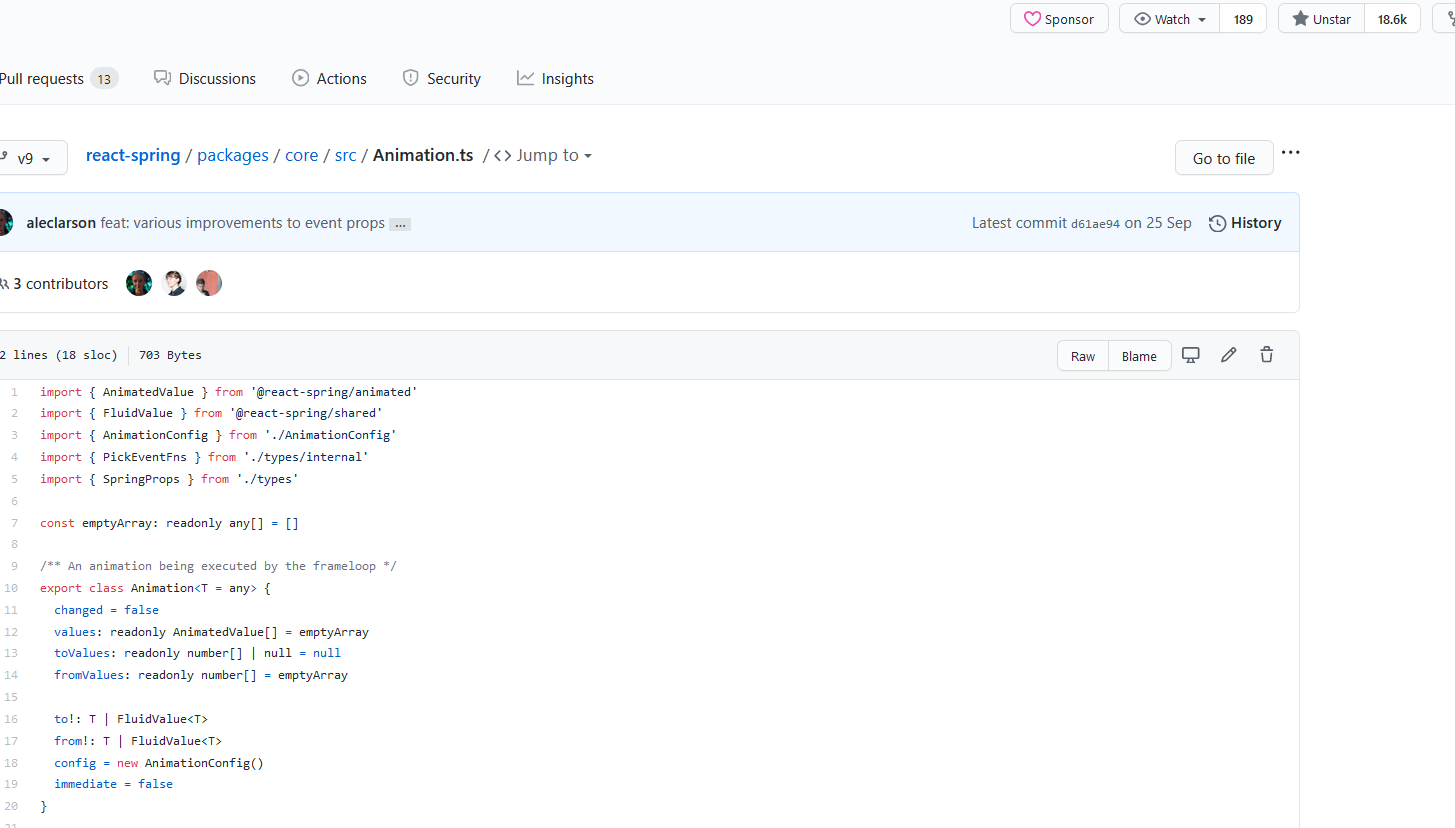
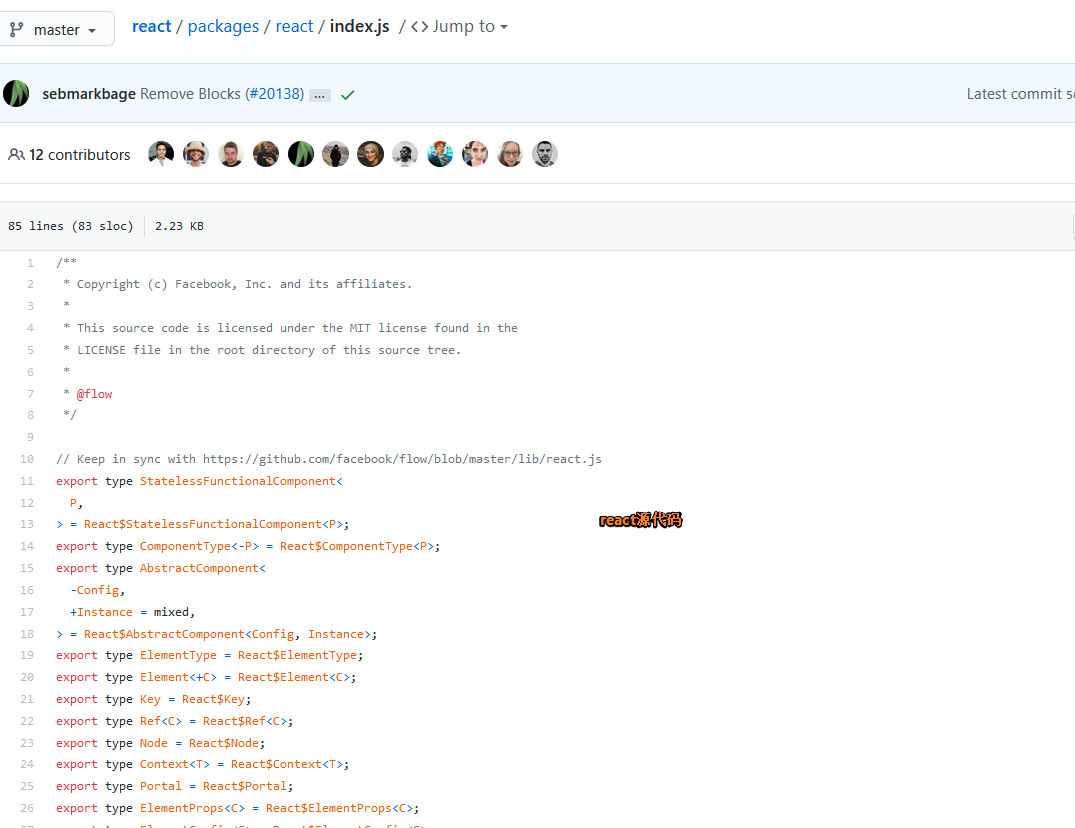
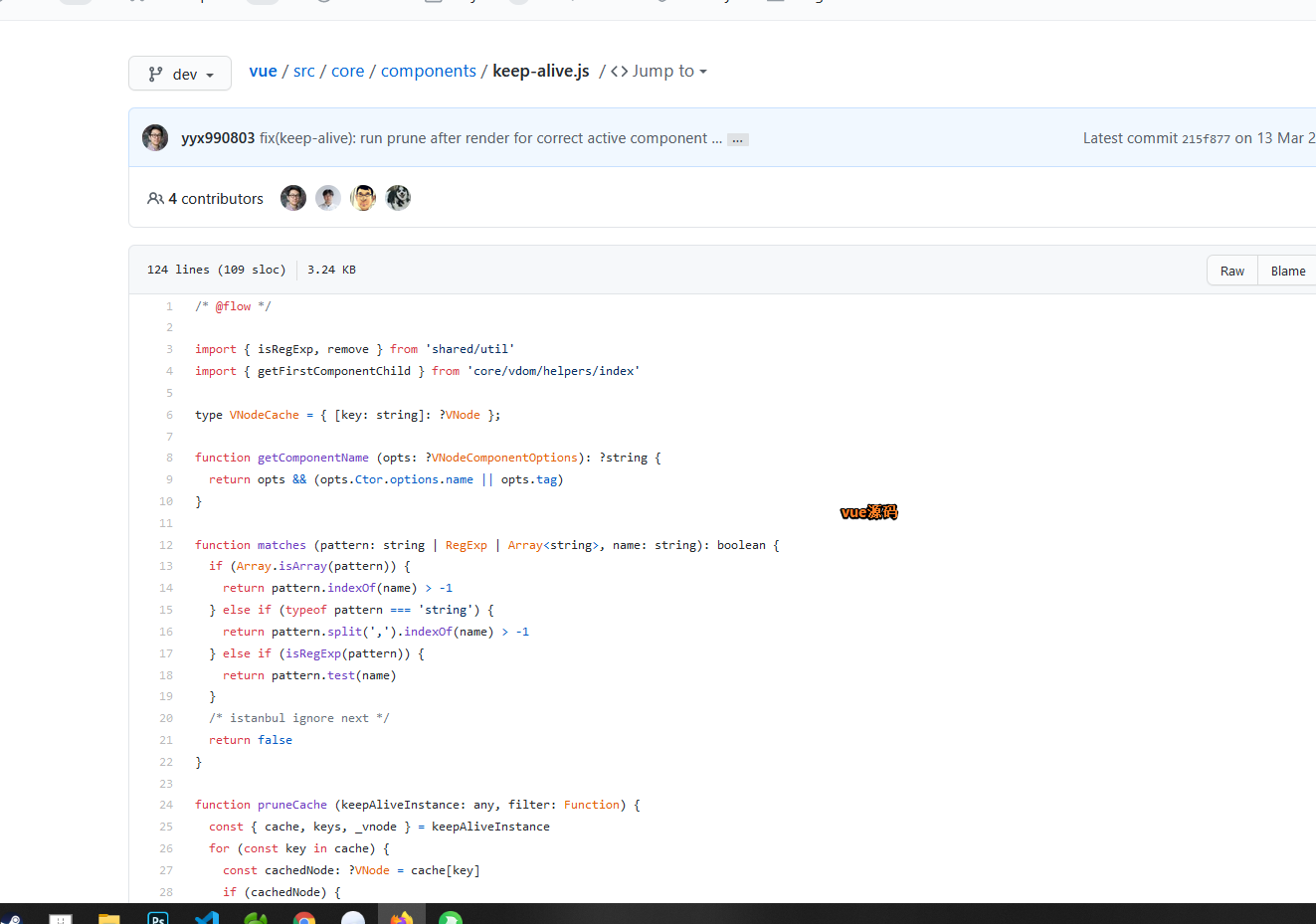
总结:我认为在这件事情的探讨过度,无疑是浪费时间的东西!!,
二、代码构建模式上的说明
1.IDE的快捷键的学习
- IDE的快捷键的学习
- 打开终端 ( ctrl + ` ) 终端新开( ctrl + shift + 5 ), 终端内部切换( alt + 上下左右 ) , 切换终端组()
- 指定工作目录 新建终端 ( ctrl + shift + ` )
- 分屏和切换屏: 新开一个分屏( ctrl + \ ),切换分屏( ctrl + up 或者 down ),关闭某一个分屏 ( ctrl + w ) ,屏内组切换( ctrl + k 之后 ctrl + up或者down )
- 打开指定文件( ctrl + shift + p ),切换到工作树
- 浏览的操作。依然还是需要鼠标的
2.有关于打包的问题
- 有关于打包的问题
- 打包更新下午的时候一次,晚上的时候一次
- 任务点击的时候也是,中午一次,晚上一次,只有这样才能通知哪些已经确认人去确认,注意啊。你确认过的任务一定是先发包再点击完成!
3.Modal和draw构建方式(各种弹出层的处理)
- [x] 由于modal和draw这两个东西和当前的页面组件的通信和依赖比较的严重,不好也不是很适合解耦出去,因此,现行我认为比较好的构建方式如下
- [x] 核心代码
const props = {
    visible,
    loading,
    obj,
    onCancel: () => {
      setVisible(false);
      setObj(false);
    },
    onSubmit: (values: any) => {
      saveData(values);
    },
  };
// NetworkDomain 网络规划
import React, { useState, useRef } from 'react'
import { useRequest } from 'ahooks';
import ProTable, { ActionType, ProColumns } from '@ant-design/pro-table';
import { PageHeaderWrapper } from '@ant-design/pro-layout';
import config from '@/utils/config';
import { Button, Space, message, Popconfirm, Card, } from 'antd';
import { page, networkSave, networkDel } from './service';
import AddModal from './AddModal';
import { SizeType } from 'antd/lib/config-provider/SizeContext';
import { Link } from 'umi';
/**
* Preset
*/
const NetworkDomain: React.FC<any> = () => {
/**
* state
*/
const actionRef = useRef<ActionType>();
const [size, setSize] = useState<SizeType>('middle');
const [sorter, setSorter] = useState<any>('');
const [sortOrder, setSortOrder] = useState<any>('');
const [visible, setVisible] = useState<boolean>(false);
const [obj, setObj] = useState<boolean>(false);
/**
* method
*/
const onTableChange = (p: any, f: any, s: any) => {
setSorter(s.field || '');
setSortOrder(s.order || '');
};
const { run: delData } = useRequest(networkDel, {
manual: true,
onSuccess: (result) => {
if (result.success) {
actionRef.current?.reset()
actionRef.current?.reload()
}
},
});
const { run: saveData, loading } = useRequest(networkSave, {
manual: true,
onSuccess: (result, params) => {
actionRef?.current?.reload();
if (result.success) {
result.data && message.success(result.codeMessage);
setVisible(false);
setObj(false);
}
},
});
const loadData = async (params: any) => {
const response = await page(params);
return {
success: response.success,
...response.data,
};
};
const handleEdit = (obj: any) => {
setObj(obj);
setVisible(true);
};
const handleDel = (id: any) => {
delData(id);
};
const props = {
visible,
loading,
obj,
onCancel: () => {
setVisible(false);
setObj(false);
},
onSubmit: (values: any) => {
saveData(values);
},
};
/**
* effct
*/
/**
* componentsConfig
*/
const header = (
<Space>
<Button
size={size}
type="primary"
onClick={() => {
setVisible(true);
}}
>
新增
</Button>
</Space>
);
const columns: ProColumns<any>[] = [
{
title: '名称',
key: 'name',
dataIndex: 'name',
render: (_, dom) => {
return <Link
to={{
pathname: '/networkDomain/networkShort',
state: {
areaId: dom.id,
name: dom.name,
description: dom.description
},
}}
>{_}</Link>
}
},
{
title: '描述',
dataIndex: 'description',
ellipsis: true,
},
{
title: '操作',
valueType: 'option',
dataIndex: 'id',
width: 200,
fixed: 'right',
render: (text: any, record: any) => (
<>
<Space>
{/* <Tag color={config.editColor}> */}
<a onClick={() => handleEdit(record)}>编辑</a>
{/* </Tag> */}
{/* <Tag color={config.deleteColor}> */}
<a>
<Popconfirm
title="您确认要删除该全局属性么?"
onConfirm={() => handleDel(record.id)}
okText="是"
cancelText="否"
>
删除
</Popconfirm>
</a>
{/* </Tag> */}
</Space>
</>
),
},
];
/**
* render
*/
return (
<PageHeaderWrapper title="网络域规划">
<Card >
<div style={{ minHeight: 650 }}>
<ProTable
actionRef={actionRef}
columns={columns}
request={(params) => loadData(params)}
params={{ sorter, sortOrder }}
size={size}
rowKey="id"
headerTitle={header}
// rowSelection={{}}
search={false}
tableAlertRender={() => false}
onSizeChange={(size) => setSize(size)}
onChange={(p, f, s) => onTableChange(p, f, s)}
pagination={config.paginationDisplay}
scroll={{ x: 1250, y: 450 }}
toolBarRender={(action, { selectedRows }) => []}
/>
<AddModal {...props} />
</div>
</Card>
</PageHeaderWrapper>
)
}
export default NetworkDomain
// AddModal 网络域新增编辑的弹出层
import React, { useState, useRef, useEffect, useCallback, useContext } from 'react'
import config from '@/utils/config';
import { Form, Input, Modal } from 'antd';
import { validation } from './service'
/**
* Preset
*/
const { TextArea } = Input;
const AddModal: React.FC<any> = ({ obj = {}, visible, onCancel, onSubmit, loading }) => {
/**
* state
*/
const [form] = Form.useForm();
/**
* method
*/
const onOk = () => {
form
.validateFields()
.then((values) => {
const data = { ...values }
if (obj.id) {
data.id = obj.id
}
onSubmit({ ...data });
})
.catch((info) => {
console.log('Validate Failed:', info);
});
};
const close = () => {
clear();
onCancel();
};
const clear = () => {
form.resetFields();
};
const validationName = (rule, value, callback) => {
try {
let data = {}
if (obj && obj.id) {
data.id = obj.id
}
data.name = value
validation(data).then((res) => {
if (res && res.data && res.success) {
callback();
} else {
callback('网络域已存在');
}
})
data = null
} catch (err) {
callback(err);
}
}
/**
* effct
*/
useEffect(() => {
if (visible) {
form.setFieldsValue({
...obj,
});
}
}, [visible]);
/**
* componentsConfig
*/
/**
* render
*/
return (
<>
<Modal
visible={visible}
title={`${obj.id ? '编辑网络域' : '新增网络域'}`}
onCancel={() => close()}
confirmLoading={loading}
afterClose={() => clear()}
width={700}
okText="提交"
cancelText="取消"
onOk={() => onOk()}
>
<Form form={form} layout="horizontal" name="networkForm">
<Form.Item
{...config.modalFormItemLayout}
label="网络域"
name="name"
rules={[
{
required: true,
message: '请输入网络域名称',
},
{ validator: validationName },
]}
>
<Input placeholder="请输入网络域名称" />
</Form.Item>
<Form.Item
label="描述"
{...config.modalFormItemLayout}
name="description">
<TextArea />
</Form.Item>
</Form>
</Modal>
</>
)
}
export default AddModal4. 文件夹层次的构建方案和命名方案
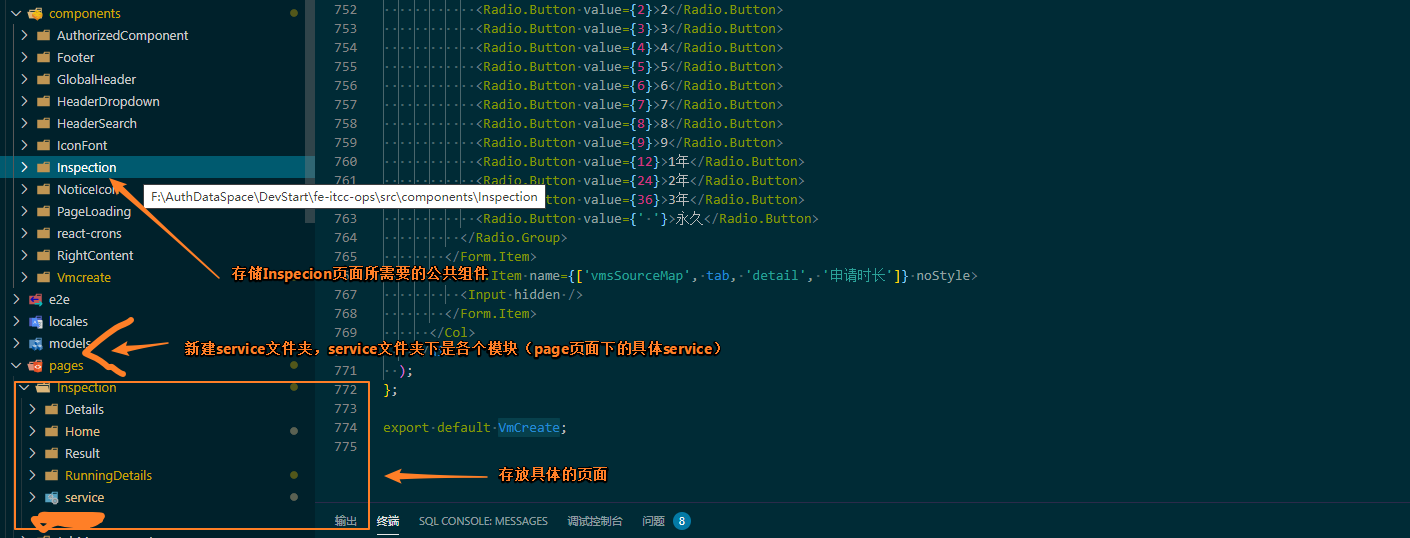
个人推荐的做法
page下仅仅是放页面用来组装组件,而不应该存放各种各样的组件的具体实现,component里了解一下,component里才是放置具体组件的所在位置
5.如何只tabl中构建一些独立且又各自有状态的组件?
我们先来看看,你如何完成如下的效果
很明显,要想实现这样的效果你必须让没一个row数据都搞定独立的加载一个组件出来,这个时候,性能和效果就要做取舍了