React Navigation 实现方案:路由管理与页面跳转
December 19, 2024 (1y ago)
前面我们仅仅是完成了 非常简单的东西,但是对于Router 没有一个明确的实现出来 ,完整的实现出来,说白了,现在的这个项目还是一个 不完整的项目,它连0.0.1 的版本都算不上. 现在我们来完善它,把navigation 完善掉
关于 router navigation 的配置
总体的设计方案和思路
总体的思路比较的简单,我们用原生处理多个View视图(不管是Android还是IOS)并且把他们存储在一个Array中模拟Stuck ,push 就往里面加,pop 就弹出去; 在RN端我们使用react-navigation 处理 主模块。完成侧边栏 + bar-navigation + 一些重要的模块。其他的部分都自己去完成 stuck 操作就好 ,就不要用其他的navigation了只要 一种stuck 就好
// 这个要到mobx 里面去
navigation = {
  statick:{} // 这里保存 本模块 navigation 的实例 或者一些东西
  // stuck 操作
  push:() => {},
  back:() => {},
  // tab 栏
  barNavigation: () => {},
}
IOS 实现细节
RN的集成Navigation
明确我们的目标,我们希望可以实现seller App 一样的效果
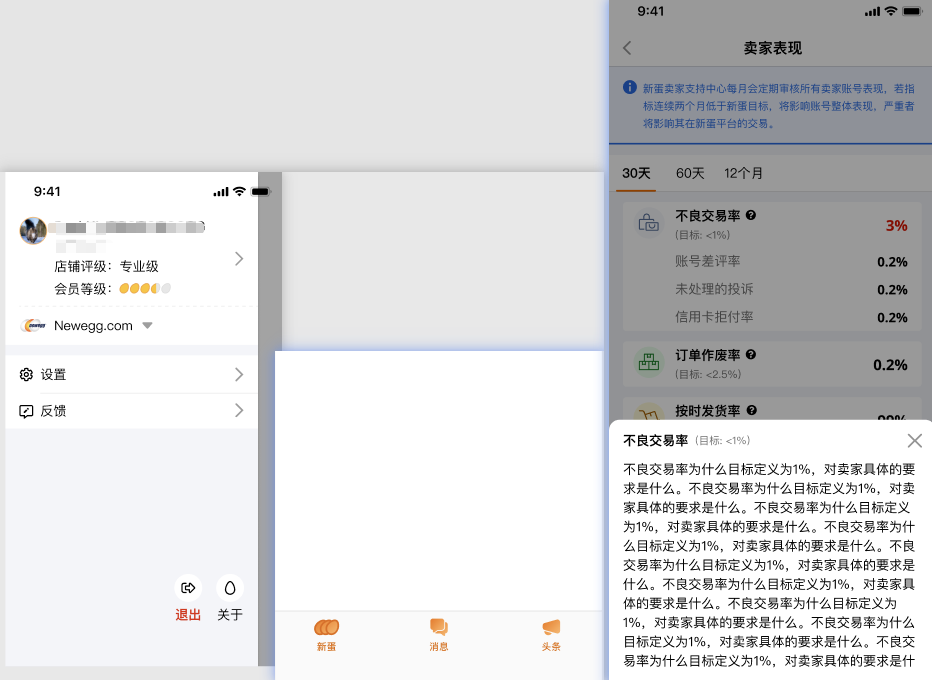
那么其重要的细节如下 ,下面是部分参考代码
参考
// 独立页面在此注入路由
const AppStack = {
  default: 'AppStack',
  initialRouteName: 'Guide',
  Screen: [
    {
      // 全局的一些些吗都平铺开
      name: 'Guide',
      option: {headerShown: false},
      components: Guide,
    },
    {
      name: 'PDF',
      option: {headerShown: false},
      components: PDF,
    },
    {
      name: 'WebViewSDK',
      option: {headerShown: false},
      components: WebViewSDK,
    },
    {
      name: 'AfterSalesDetails',
      option: {
        headerShown: false,
        headerTransparent: true,
      },
      components: AfterSalesDetails,
    },
    // 切换底部导航抽屉
    {
      name: 'ScanLayout',
      option: {headerShown: false},
      components: ScanLayout,
    },
    // AppStack -> 抽屉 -> 导航
    {
      name: 'Dre',
      option: {headerShown: false},
      components: DrawerStackNavigator,
    },
  ],
};

const AppModules = createNativeStackNavigator();
function AppStackComponent() {
  if (Platform.OS === 'android') {
    StatusBar.setBackgroundColor('#00000000');
  }
  return (
    <AppModules.Navigator {...AppStack}>
      {AppStack.Screen.map((item, index) => {
        const localoptions = Platform.OS === 'android' ? {...item.option, statusBarStyle: 'dark'} : item.option;
        return (
          //@ts-ignore
          <AppModules.Screen
            key={index}
            // @ts-ignore
            options={localoptions}
            listeners={{
              state: (e) => {
                DrawerCode.hide();
              },
            }}
            name={item.name}
            component={RouterComponent(item)}
          />
        );
      })}
    </AppModules.Navigator>
  );
}

// 这个RouterCompoent 是一个全局的layout
import {useEffect} from 'react';
import {useNavigation} from '@react-navigation/native';
import store from '@/module/Main/store';

const {routerStore} = store;

const RouterComponent = (props: any) => {
  // 保存当前状态到RouterStore
  const navigation = useNavigation();
  useEffect(() => {
    routerStore.setNavigation(navigation);
  }, []);
  return props.components;
};

export default RouterComponent;

// routerStore
import {makeAutoObservable, observable} from 'mobx';
import {NavigationProp} from '@react-navigation/native';

class RouterStore {
  constructor() {
    makeAutoObservable(this, {
      navigation: observable,
    });
  }

  navigation: NavigationProp<ReactNavigation.RootParamList> | undefined = undefined;

  setNavigation = (newNavigation: NavigationProp<ReactNavigation.RootParamList>) => {
    this.navigation = newNavigation;
  };
}
const routerStore = new RouterStore();

export default routerStore;

// store
import routerStore from './routerStore';
export default {
  routerStore
}
import {createBottomTabNavigator} from '@react-navigation/bottom-tabs';

const TabNai = createBottomTabNavigator();
const TabNavigator: React.FC<{}> = (props) => {
  const {t} = useTranslation();
  const {unRed} = useLocalObservable(() => store.messageStore);

  const newEgg = t('g-newegg');
  const message = t('g-message');
  const headline = t('g-headline');
  const tabBarLayout = (iconSource: any, isRed?: boolean) => {
    return (
      <View style={styles.icon}>
        {isRed && <View style={[styles.noRed]}></View>}
        <Image style={{width: '100%', height: '100%'}} source={iconSource} />
      </View>
    );
  };

  // Tab需要配置项
  const TabStackConfig = {
    name: 'TabStackConfig',
    initialRouteName: 'NavTestHome',
    Screen: [
      {
        name: 'TabNewEgg',
        option: {
          headerShown: false,
          tabBarLabel: newEgg,
          tabBarIcon: (info: any) => {
            const {focused} = info;
            const imgSourcePath = focused
              ? require('../../assets/images/activeICON/default.png')
              : require('../../assets/images/notAcitve/default.png');
            return tabBarLayout(imgSourcePath);
          },
        },
        components: Home,
      },
      {
        name: 'TabMessage',
        option: {
          headerShown: false,
          tabBarLabel: message,
          tabBarIcon: (info: any) => {
            const {focused} = info;
            const imgSourcePath = focused
              ? require('../../assets/images/activeICON/message.png')
              : require('../../assets/images/notAcitve/message.png');
            return tabBarLayout(imgSourcePath, Boolean(unRed));
          },
        },
        components: Community,
      },
      // {
      //   name: 'TabHeadline',
      //   option: {
      //     headerShown: false,
      //     tabBarLabel: headline,
      //     tabBarIcon: (info: any) => {
      //       const {focused} = info;
      //       const imgSourcePath = focused
      //         ? require('../../assets/images/activeICON/nx.png')
      //         : require('../../assets/images/notAcitve/nx.png');
      //       return tabBarLayout(imgSourcePath);
      //     },
      //   },
      //   components: nx,
      // },
    ],
  };
  return (
    <TabNai.Navigator
      screenOptions={() => ({
        tabBarActiveTintColor: globalStyle.colors.orange6,
        tabBarInactiveTintColor: globalStyle.colors.gray7,
      })}
    >
      {TabStackConfig.Screen.map((item, index) => {
        return <TabNai.Screen key={index} options={item.option} name={item.name} component={RouterComponent(item)} />;
      })}
    </TabNai.Navigator>
  );
};

export default observer(TabNavigator);

// 下面是三个tab
// Tab需要配置项
const CommunityStackConfig = {
  name: 'CommunityStackConfig',  // 这个东西也许不需要🤔
  initialRouteName: 'NavTestHome',
  Screen: [
    {
      name: 'Community',
      option: {headerShown: false},
      components: Community,
    },
  ],
};

const CommunityStackNavigator = createNativeStackNavigator();
const CommunityStack = () => {
  return (
    <CommunityStackNavigator.Navigator {...CommunityStackConfig}>
      {CommunityStackConfig.Screen.map((item, index) => {
        return (
          <CommunityStackNavigator.Screen
            key={index}
            options={item.option}
            name={item.name}
            component={RouterComponent(item)}
          />
        );
      })}
    </CommunityStackNavigator.Navigator>
  );
};

export default CommunityStack;

// Tab需要配置项
const HomeStackConfig = {
  name: 'NewEggStackConfig',
  Screen: [
    {
      name: 'NewEgg',
      option: {headerShown: false},
      components: Home,
    },
  ],
};

const HomeStackNavigator = createNativeStackNavigator();

const HomeStack = () => {
  return (
    <HomeStackNavigator.Navigator {...HomeStackConfig}>
      {HomeStackConfig.Screen.map((item, index) => {
        return (
          <HomeStackNavigator.Screen
            key={index}
            options={item.option}
            name={item.name}
            component={RouterComponent(item)}
          />
        );
      })}
    </HomeStackNavigator.Navigator>
  );
};


// Tab需要配置项 (这个是为了打算做的News模块,目前暂时没有)
const NeweggStackStackNavigatorConfig = {
  name: 'HeadlineStackConfig',
  Screen: [
    {
      name: 'Headline',
      option: {headerShown: false},
      components: NX,
    },
  ],
};

const NeweggStackStackNavigator = createNativeStackNavigator();
export const NeweggStackStack = () => {
  return (
    <NeweggStackStackNavigator.Navigator {...NeweggStackStackNavigatorConfig}>
      {NeweggStackStackNavigatorConfig.Screen.map((item, index) => {
        return (
          <NeweggStackStackNavigator.Screen
            key={index}
            options={item.option}
            name={item.name}
            component={RouterComponent(item)}
          />
        );
      })}
    </NeweggStackStackNavigator.Navigator>
  );
};
import {RouterComponent} from '@/common/components/container';
const DrawerStackConfig = {
  name: 'DrawerStack',  // 思考一下 这个地方是否可以都去掉,直接用外面平铺的东西?
  Screen: [
    {
      name: 'AccountDrawer',
      option: {
        headerShown: false,
        drawerStyle: {width: '86%'},
      } as DrawerNavigationOptions,
      components: TabNavigator,
    },
  ],
};

// 抽屉
const StackDrawer = createDrawerNavigator();
const DrawerStackNavigator = (props: any) => {
  return (
    <StackDrawer.Navigator drawerContent={(props) => <SettingDrawer {...props} />} initialRouteName="DrawerStack">
      {DrawerStackConfig.Screen.map((item, index) => {
        return (
          <StackDrawer.Screen
            key={index}
            options={{...item.option, drawerType: 'front'}}
            name={item.name}
            component={RouterComponent(item)}
          />
        );
      })}
    </StackDrawer.Navigator>
  );
};

export default DrawerStackNavigator;
关于router 如何跳转
import {makeAutoObservable, observable} from 'mobx';
import {NavigationProp} from '@react-navigation/native';

class RouterStore {
  constructor() {
    makeAutoObservable(this, {
      navigation: observable,
    });
  }

  navigation: NavigationProp<ReactNavigation.RootParamList> | undefined = undefined;

  setNavigation = (newNavigation: NavigationProp<ReactNavigation.RootParamList>) => {
    this.navigation = newNavigation;
  };
}
const routerStore = new RouterStore();

export default routerStore;

//
const navigateTo = (routeName: string, params?: any) => {
  RouterEvent({
    navigation: routerStore.navigation!,
    action: StackActions.push(routeName, params),
  });
};


import {NavigationAction, NavigationProp, NavigationState} from '@react-navigation/native';
interface RouterAction {
  navigation: NavigationProp<ReactNavigation.RootParamList>;
  Route?: 'AppStack' | 'DrawerStack' | 'TabStack';
  action: NavigationAction | ((state: NavigationState) => NavigationAction);
}

// 父类
const RouterEvent = (prams: RouterAction) => {
  const {navigation, Route = '', action} = prams;
  if (!Route) {
    navigation.dispatch(action);
    return;
  }
  findRoute(navigation, Route).dispatch(action);
};

//  递归回溯 找到你需要的Route层级
const findRoute = (
  navigation: RouterAction['navigation'],
  RouteName: 'AppStack' | 'DrawerStack' | 'TabStack',
): RouterAction['navigation'] => {
  const RouteList: Array<RouterAction['navigation']> = [];
  const find = (navigation: RouterAction['navigation']) => {
    if (!navigation?.getParent()?.getState()) {
      RouteList.push(navigation);
      return;
    }
    RouteList.push(navigation);
    find(navigation.getParent());
  };
  find(navigation);

  enum MapNames {
    'AppStack' = 'WebViewSDK',
    'DrawerStack' = 'drawer1',
    'TabStack' = '新蛋',
  }
  const fish = RouteList.find((item) => item.getState()?.routeNames.find((it) => it === MapNames[RouteName]));
  return fish || navigation;
};

// AppEntryEvent
const entryEvent = () => {};

export {RouterEvent, entryEvent};
好以上,就是Seller App 的样子,其中的代码都是做来隐私保护,没有全部的源码,只是部分核心
实现
设计
重要说明
- index 只放主要的main 模块
- 其他的模块都自己去引用 不要,放到index 去引,也不需要模块之前相互引
- 公共模块和组件 ,请丢common 包中
navigation 分类
- 以stuck 为主,在Main 中分了 navigation bar,和draw, (对于侧边栏 我们需要调整原来的IOS侧 拆包方案,让它能够支持 reanimated)-相关的Issues Reanimated接入问题 · Issue #10 · ljunb/rn-relates
https://github.com/software-mansion/react-native-reanimated/issues/846#issuecomment-943267584,但是目前我们的尝试还是具有局限性的就是,左滑动返回 需要禁用 原生view的返回,要不然当RN-Navigation 去接管的时候回引发 左侧只执行 原生view 的back 而不会执行 RN-Navigation 的back ,如果我们禁用原生的View back ,那么在模块主stuck 的时候无法左滑 back 其余都能正常使用。目前还没有非常好的方式去控制它
- 其他模块请全部使用 stuck ,如果有draw需求,请使用draw组件
统一的navigation 处理所有跳转等业务逻辑
为了统一所有的page 跳转行为,我建议封装一个自己用的,但是这个封装要注意!得支持在非 组件中使用,比如全局拦截器中也想控制跳转,但....他是个ts存逻辑,当然可以使用rxjs 的方式发送给根组件,执行跳转也ok,具体看设计,有两种,下面的例子就是使用了 mobx 处理的
  if (inMaintain.includes(ResponseCode)) {
    RouterEvent({
      navigation: routerStore.navigation!,
      Route: 'AppStack',
      action: StackActions.replace('Maintain', {
        startTime: timeArr[0] || '2021-10-29T02:04:31.105Z',
        entTime: timeArr[1] || '2021-10-30T07:19:00.000Z',
      }),
    });
    return true;
  }
前置模块
- 前置模块安装
# 使用stuck 需要这些模块  https://reactnavigation.org/docs/getting-started
yarn add react-native-screens react-native-safe-area-context
# 使用draw 需要这些模块 https://reactnavigation.org/docs/drawer-navigator/
yarn add react-native-gesture-handler react-native-reanimated
# 使用button 需要这些模块 https://reactnavigation.org/docs/material-bottom-tab-navigator (大部分情况下 你需要icon 最好用这个)
yarn add @react-navigation/material-bottom-tabs react-native-paper react-native-vector-icons- 配置 对于 react-native-reanimated 我们要配置 要不然会引发下面的问题
https://docs.swmansion.com/react-native-reanimated/docs/fundamentals/installation/
[Sat Nov 12 2022 16:17:10.780]  ERROR    Error: Failed to initialize react-native-reanimated library, make sure you followed installation steps here: https://docs.swmansion.com/react-native-reanimated/docs/fundamentals/installation/
1) Make sure reanimated's babel plugin is installed in your babel.config.js (you should have 'react-native-reanimated/plugin' listed there - also see the above link for details)
2) Make sure you reset build cache after updating the config, run: yarn start --reset-cache
[Sat Nov 12 2022 16:17:10.782]  ERROR    Invariant Violation: Module AppRegistry is not a registered callable module (calling runApplication)
[Sat Nov 12 2022 16:17:10.783]  ERROR    Invariant Violation: Module AppRegistry is not a registered callable module (calling runApplication)
[Sat Nov 12 2022 16:18:12.743]  ERROR    Invariant Violation: Module AppRegistry is not a registered callable module (calling unmountApplicationComponentAtRootTag)
[Sat Nov 12 2022 16:18:13.786] ERROR Invariant Violation: Module AppRegistry is not a registered callable module (calling runApplication)- 正确的处理 需要在bable中加上配置
module.exports = {
  presets: ['module:metro-react-native-babel-preset'],
  plugins: [
    [
      'module-resolver',
      {
        extensions: ['.tsx', '.ts', '.js', '.json'],
        alias: {
          [pak.name]: path.join(__dirname, '..', pak.source),
        },
      },
    ],
    ['react-native-reanimated/plugin'],
  ],
};
_如果可能建议使用 yarn start --reset-cache --port=8082_运行
具体细节
/*------------------------------router.ts------*/
/* eslint-disable no-undef */
import DrawerStackNavigator from '../Drawer';
import M1 from '../modules/page/Modules1';
import M2 from '../modules/page/Modules2';

export interface InterRouterItem {
  default: string;
  initialRouteName: string;
  Screen: Array<InterScreen>;
}

interface InterScreen {
  name: string;
  component: () => React.ReactNode;
  options?: any;
}

//  Stuck
const AppStack: InterRouterItem = {
  default: 'AppStack',
  initialRouteName: 'Drawer',
  Screen: [
    {
      name: 'M1',
      component: M1,
      options: {
        headerShown: true, // 默认把头部处理掉,因为它的头部 还是希望交给它自己处理/公用组件
      },
    },
    {
      name: 'M2',
      component: M2,
      options: {
        headerShown: true,
      },
    },
    // 注意 dre 下套 tab 才能达到我们想要的效果
    {
      name: 'Drawer',
      options: {
        headerShown: false,
      },
      component: DrawerStackNavigator,
    },
  ],
};

export default AppStack;

/*------------------------------App.js------*/
/* eslint-disable @typescript-eslint/no-unused-vars */
import * as React from 'react';
import { NavigationContainer } from '@react-navigation/native';
import { createNativeStackNavigator } from '@react-navigation/native-stack';
import { SafeAreaProvider } from 'react-native-safe-area-context';
import 'react-native-gesture-handler';
import 'react-native-reanimated';

import AppStack from './routes';

const RouterComponent = (props: any) => {
  return props.component;
};

// 收口
const AppModules = createNativeStackNavigator();
const Router = () => {
  return (
    <AppModules.Navigator {...AppStack}>
      {AppStack.Screen.map((item) => {
        return (
          <AppModules.Screen
            key={item.name}
            name={item.name}
            options={item.options}
            component={RouterComponent(item)}
          />
        );
      })}
    </AppModules.Navigator>
  );
};

export default function App() {
  return (
    <SafeAreaProvider>
      <NavigationContainer>
        <Router />
      </NavigationContainer>
    </SafeAreaProvider>
  );
}
/*------------------------------Drawer,js------*/
/* eslint-disable @typescript-eslint/no-unused-vars */
import {
  createDrawerNavigator,
  DrawerNavigationOptions,
} from '@react-navigation/drawer';
import TabNavigation from './TabNavigation';
import React from 'react';
import { Button, Text, View } from 'react-native';

const DrawerStackConfig = {
  name: 'DrawerStack', // 思考一下 这个地方是否可以都去掉,直接用外面平铺的东西?
  Screen: [
    {
      name: 'DrawerStack',
      options: {
        headerShown: false,
        drawerStyle: { width: '86%' },
      } as DrawerNavigationOptions,
      component: TabNavigation,
    },
  ],
};

const SettingDrawer = (props: any) => {
  return (
    <View>
      <Text>2</Text>
      <Button title="x" />
    </View>
  );
};

const RouterComponent = (props: any) => {
  // 保存当前状态到RouterStore
  // const navigation = useNavigation();
  // useEffect(() => {
  //   routerStore.setNavigation(navigation);
  // }, []);
  return props.component;
};

// 抽屉
const StackDrawer = createDrawerNavigator();
const DrawerStackNavigator = () => {
  return (
    <StackDrawer.Navigator
      id="LeftDrawer"
      drawerContent={(props) => <SettingDrawer {...props} />}
      initialRouteName="DrawerStack"
    >
      {DrawerStackConfig.Screen.map((item, index) => {
        return (
          <StackDrawer.Screen
            key={index}
            options={{ ...item.options, drawerType: 'front' }}
            name={item.name}
            component={RouterComponent(item)}
          />
        );
      })}
    </StackDrawer.Navigator>
  );
};

export default DrawerStackNavigator;
/*------------------------------index,js------*/
/* eslint-disable prettier/prettier */
import React from 'react';
import { createBottomTabNavigator } from '@react-navigation/bottom-tabs';
import { Button, Text, View } from 'react-native';
import { CommonActions, useNavigation } from '@react-navigation/native';
import { SafeAreaView } from 'react-native-safe-area-context';

const B1 = () => {
  const navigate = useNavigation();
  return (
    <SafeAreaView>
      <View>
        <Text>B1</Text>
        <View>
          <Button
            title="OPEN_D"
            onPress={() => {
              const drawerNavigation = navigate.getParent(
                'LeftDrawer' as any
              ) as any;
              drawerNavigation.openDrawer();
            }}
          />
        </View>
        <View>
          <Button
            title="GO_M1"
            onPress={() => {
              navigate.dispatch(
                CommonActions.navigate({
                  name: 'M1',
                  params: {},
                })
              );
            }}
          />
        </View>
      </View>
    </SafeAreaView>
  );
};

const B2 = () => {
  return (
    <View>
      <Text>B2</Text>
    </View>
  );
};

const B3 = () => {
  return (
    <View>
      <Text>B3</Text>
    </View>
  );
};

const B4 = () => {
  return (
    <View>
      <Text>B4</Text>
    </View>
  );
};

const B5 = () => {
  return (
    <View>
      <Text>B5</Text>
    </View>
  );
};

const RouterComponent = (props: any) => {
  // 保存当前状态到RouterStore
  // const navigation = useNavigation();
  // useEffect(() => {
  //   routerStore.setNavigation(navigation);
  // }, []);
  return props.component;
};

const TabNai = createBottomTabNavigator();
const TabNavigator: React.FC<{}> = () => {
  // Tab需要配置项
  const TabStackConfig = {
    name: 'TabStackConfig',
    initialRouteName: 'B3',
    Screen: [
      {
        name: 'B1',
        option: {
          headerShown: false,
          // tabBarLabel: <></>,
        },
        component: B1,
      },
      {
        name: 'B2',
        option: {
          headerShown: false,
          // tabBarLabel: <></>,
        },
        component: B2,
      },
      {
        name: 'B3',
        option: {
          headerShown: false,
          // tabBarLabel: <></>,
        },
        component: B3,
      },
      {
        name: 'B4',
        option: {
          headerShown: false,
          // tabBarLabel: <></>,
        },
        component: B4,
      },
      {
        name: 'B5',
        option: {
          headerShown: false,
          // tabBarLabel: <Text>2</Text>,
        },
        component: B5,
      },
    ],
  };

  return (
    <TabNai.Navigator
    // screenOptions={() => ({
    //   tabBarActiveTintColor: '#F06C00',
    //   tabBarInactiveTintColor: '#858585',
    // })}
    >
      {TabStackConfig.Screen.map((item, index) => {
        return (
          <TabNai.Screen
            key={index}
            options={item.option}
            name={item.name}
            component={RouterComponent(item)}
          />
        );
      })}
    </TabNai.Navigator>
  );
};

export default TabNavigator;
🤔我们能不能去掉多余的全局stuck 全用一个Drawer 其他的全部丢它里面就好啦呢?
....
Android 实现细节
Layout的设计
/* eslint-disable sonarjs/cognitive-complexity */
/*
 * @Author: aoda
 * @Date: 2021-10-20 19:27:50
 * @Description: app头部组件
 */
import React, {memo, ReactNode, useEffect} from 'react';
import {StatusBar, View, Text, Image, ScrollView, TouchableWithoutFeedback, Platform, ViewStyle} from 'react-native';
import {useState} from 'react';
import styles from './style';
import {useNavigation} from '@react-navigation/core';
import RNExitApp from 'react-native-exit-app';
import {SafeAreaView} from 'react-native-safe-area-context';

type codeType = string | number | ReactNode;
interface props {
  leftCode?: codeType; // 左边code
  leftEvent?: () => void; // 左边事件
  titleCode: codeType; // 中间code
  rightCode?: codeType; // 右边标题
  rightEvent?: () => void; // 右边事件
  children: ReactNode; //  --------V2-----新增的属性
  scroll?: boolean; // 是否支持滚动
  immersive?: {
    // 是否需要沉浸式的用户体验
    backgroundColor: string; // 背景颜色
  };
  // Header 底部 自定义渲染  一般 需要和 needHeadLind 一起使用
  needBodyStyle?: boolean; // 是否需要body的整个padding距离
  needHeadLind?: boolean; // 是否允许有底部边框
  renderHeaderFooter?: ReactNode;
  wrapBgStyle?: ViewStyle;
  content?: React.ReactNode; //  完完全全的自定义
  notSafe?: false; // 去掉安全区域?
}

const PageLayout: React.FC<props> = (props) => {
  const {scroll = true, needHeadLind = true, needBodyStyle = true, renderHeaderFooter} = props;
  const route = useNavigation();
  const [isTopNav, setIsTopNav] = useState(route.canGoBack());
  const goBack = () => {
    if (route.canGoBack()) {
      setIsTopNav(false);
      route.goBack();
    } else {
      setIsTopNav(true);
      RNExitApp.exitApp();
    }
  };
  const {leftCode, leftEvent = goBack, titleCode, rightCode = '', rightEvent, immersive} = props;

  // 如果设置了“沉浸式”的效果 则自动运行此代码片段
  useEffect(() => {
    if (immersive && Platform.OS === 'android') {
      StatusBar.setBackgroundColor(immersive?.backgroundColor);
      StatusBar.setTranslucent(true);
    }
    return () => {
      Platform.OS === 'android' && immersive && StatusBar.setTranslucent(false);
    };
  }, []);

  return (
    <SafeAreaView
      mode="padding"
      edges={['right', 'top', 'left']}
      style={[styles.safeBgColor, immersive && {backgroundColor: immersive.backgroundColor}]}
    >
      <View style={[styles.layoutWrap]}>
        {props?.content ? (
          props?.content
        ) : (
          <View style={[]}>
            <View
              style={[
                styles.head,
                styles.flexRowSBC,
                !needHeadLind ? styles.headNotBottom : undefined,
                {backgroundColor: immersive?.backgroundColor},
              ]}
            >
              {/* 左快 */}
              {!isTopNav || leftCode ? (
                <View style={[styles.berWrap]}>
                  {typeof leftCode === 'string' ? (
                    <TouchableWithoutFeedback onPress={leftEvent}>
                      <Text style={[styles.rightCode, styles.leftCode]}>{leftCode}</Text>
                    </TouchableWithoutFeedback>
                  ) : (
                    <>{leftCode}</>
                  )}
                </View>
              ) : (
                <TouchableWithoutFeedback onPress={leftEvent}>
                  <View style={[styles.leftIconWrap, styles.flexRowSBC, styles.berWrap]}>
                    <Image
                      source={
                        !immersive
                          ? require('@/common/assets/images/left_direct.png')
                          : require('@/common/assets/images/left_directW.png')
                      }
                      style={styles.leftIcon}
                    ></Image>
                  </View>
                </TouchableWithoutFeedback>
              )}
              {/* 标题 */}
              <View style={{flex: 1, flexDirection: 'row', justifyContent: 'center'}}>
                <Text style={[styles.title, immersive && {color: '#fff'}]}>{titleCode}</Text>
              </View>
              {/* 右快 */}
              <View
                style={[
                  styles.berWrap,
                  {
                    alignItems: 'flex-end',
                  },
                ]}
              >
                {typeof rightCode === 'string' ? (
                  <Text style={styles.rightCode} onPress={rightEvent}>
                    {rightCode}
                  </Text>
                ) : (
                  <>{rightCode}</>
                )}
              </View>
            </View>
            {renderHeaderFooter ? renderHeaderFooter : null}
          </View>
        )}
        {scroll ? (
          <ScrollView
            style={[styles.childrenWrap, !needBodyStyle ? styles.childrenNotWrap : undefined, props.wrapBgStyle]}
          >
            {props.children}
          </ScrollView>
        ) : (
          <>{props?.children}</>
        )}
      </View>
    </SafeAreaView>
  );
};
export default memo(PageLayout);


import {createNeweggStyles} from '@/common/utils/style';
import {globalStyle} from '@/common/style';
import {FonStyle} from '@/common/utils/style';
const styles = createNeweggStyles({
  safeBgColor: {
    backgroundColor: '#fff',
    flex: 1,
  },
  layoutWrap: {
    flex: 1,
    backgroundColor: '#fff',
  },
  head: {
    height: 48,
    paddingHorizontal: 16,
    borderBottomWidth: 1,
    borderBottomColor: globalStyle.colors.gray3,
  },
  flexRowSBC: {
    flexDirection: 'row',
    justifyContent: 'space-between',
    alignItems: 'center',
  },
  headNotBottom: {
    borderBottomWidth: 0,
  },
  leftIconWrap: {
    justifyContent: 'center',
    alignItems: 'center',
  },
  berWrap: {
    minWidth: 75,
    maxWidth: 75,
    overflow: 'hidden',
    paddingVertical: 10,
  },
  leftIcon: {
    width: 10,
    height: 15,
  },
  leftCode: {
    color: globalStyle.colors.gray7,
  },
  title: {
    ...FonStyle({
      fontSize: 19,
    }),
    fontWeight: '600',
    color: '#000',
    fontFamily: 'PingFang SC',
  },
  rightCode: {
    ...FonStyle({
      fontSize: 15,
    }),
    fontWeight: '600',
    color: globalStyle.colors.orange6,
    fontFamily: 'PingFang SC',
  },
  childrenWrap: {
    paddingHorizontal: 16,
  },
  childrenNotWrap: {
    paddingHorizontal: 0,
  },
});
export default styles;
关于设计稿Style
750 * 812 = IphoneX
//
import {StyleSheet, Dimensions, Platform} from 'react-native';
import {ImageStyle, TextStyle, ViewStyle} from 'react-native';
import {isTablet} from 'react-native-device-info';

export interface CustomNamedRenderStyles {
  [key: string]: ViewStyle & TextStyle & ImageStyle;
}
// 可用于直接转化的属性,
const translateProps = [
  'width',
  'height',
  'lineHeight',
  'minWidth',
  'minHeight',
  'maxWidth',
  'maxHeight',
  'marginTop',
  'marginBottom',
  'marginLeft',
  'marginRight',
  'marginVertical',
  'marginHorizontal',
  'paddingTop',
  'paddingBottom',
  'paddingLeft',
  'paddingRight',
  'paddingVertical',
  'paddingHorizontal',
  'top',
  'bottom',
  'left',
  'right',
  'lineHeight',
  'borderRadius',
  'borderTopWidth',
];
// 可用于字体的转化属性
const translateFontProps = ['fontSize', 'lineHeight'];

const translateOnWidth = (value: number) => {
  if (isNaN(value)) {
    return value;
  }
  if (isTablet()) {
    if (value === STANDARD_WIDTH) {
      return DEVICE_WIDTH;
    }
    return value;
  }
  return Math.round((value / STANDARD_WIDTH) * DEVICE_WIDTH);
};

// 设计搞尺寸以及,横竖屏切换
const STANDARD_WIDTH = 375;
const STANDARD_HEIGHT = 812;
const FONT_SIZE_SCALER: number = 1;
const DEVICE_WIDTH =
  Dimensions.get('window').width > Dimensions.get('window').height
    ? Dimensions.get('window').height
    : Dimensions.get('window').width;
const DEVICE_HEIGHT =
  Dimensions.get('window').width > Dimensions.get('window').height
    ? Dimensions.get('window').width
    : Dimensions.get('window').height;

const GLOBALWIDTH = Dimensions.get('window').width;
const GLOBALHEIGHT = Dimensions.get('window').height;

// 横竖屏切换 + 屏幕适配换算
const getTranslateWidthWithDevice = (originWidth: number): number => {
  if (isNaN(originWidth)) {
    return originWidth;
  }
  if (isTablet()) {
    if (originWidth === STANDARD_WIDTH) {
      return DEVICE_WIDTH;
    }

    return originWidth;
  }
  return Math.round((originWidth / STANDARD_WIDTH) * DEVICE_WIDTH);
};

const getTranslateHeightWithDevice = (originHeight: number): number => {
  if (isNaN(originHeight)) {
    return originHeight;
  }

  if (isTablet()) {
    return originHeight;
  }
  return Math.ceil((originHeight / STANDARD_HEIGHT) * DEVICE_HEIGHT);
};

// 设置 字体
const FonStyle = (value: Pick<TextStyle, 'fontSize' | 'lineHeight'>) => {
  const {fontSize, lineHeight} = value;
  return {
    ...(fontSize && {fontSize: getTranslateFontSize(fontSize)}),
    ...(lineHeight && {lineHeight: getTranslateLineHeight(lineHeight)}),
  };
};

// 字体缩放
const getTranslateFontSize = (originFontsize: number) => {
  return Platform.OS === 'android'
    ? getTranslateWidthWithDevice(originFontsize) * FONT_SIZE_SCALER
    : getTranslateWidthWithDevice(originFontsize);
};

// 字体Line缩放
const getTranslateLineHeight = (originLineHeight: number) => {
  return Platform.OS === 'android'
    ? parseInt((getTranslateWidthWithDevice(originLineHeight) * FONT_SIZE_SCALER).toString())
    : getTranslateWidthWithDevice(originLineHeight);
};

// 主函数
const createNeweggStyles = (styles: CustomNamedRenderStyles) => {
  const tmpStyles: CustomNamedRenderStyles = {...styles};
  for (const key in styles) {
    if (Array.isArray(styles[key])) {
      const flattenValue = Object.assign({}, styles[key]);
      styles[key] = flattenValue;
    }
    tmpStyles[key] = getTranslatePropertyWithWidth(styles[key]);
  }
  return StyleSheet.create(tmpStyles);
};

// 转换副函数
const getTranslatePropertyWithWidth = (style: {[x: string]: any; hasOwnProperty: (arg0: string) => any}) => {
  let tmpStyles: {[x: string]: any} = {...style};

  translateProps.forEach((property) => {
    if (style.hasOwnProperty(property)) {
      tmpStyles[property] = getTranslateWidthWithDevice(style[property]);
    }
  });

  translateFontProps.forEach((property) => {
    if (style.hasOwnProperty(property)) {
      tmpStyles = {
        ...tmpStyles,
        ...FonStyle(style[property]),
      };
    }
  });
  return tmpStyles;
};

export {
  getTranslateWidthWithDevice,
  getTranslateHeightWithDevice,
  FonStyle,
  getTranslateFontSize,
  getTranslateLineHeight,
  createNeweggStyles,
  GLOBALWIDTH,
  GLOBALHEIGHT,
  translateOnWidth,
};
const styles = createNeweggStyles({
  afterSaleItem: {
    backgroundColor: '#fff',
    borderRadius: 4,
    marginBottom: 12,
    padding: 8,
  },
  itemCard: {
    flexDirection: 'row',
    padding: 4,
  },
  itemCardWrap: {
    borderBottomColor: globalStyle.colors.gray3,
    marginBottom: 4,
  },
  left: {
    marginRight: 8,
  },
  itemImg: {
    width: 64,
    height: 48,
  },
  right: {
    flex: 1,
  },
  afterSaleItemTitle: {
    ...FonStyle({fontSize: 15}),
    marginBottom: 4,
  },
  sellerPort: {
    ...FonStyle({
      fontSize: 12,
    }),
    color: globalStyle.colors.gray8,
    marginBottom: 4,
  },
  timeWrap: {
    flexDirection: 'row',
    alignItems: 'center',
  },